As businesses adopt intelligent technologies, AI agents and AI automation handle business tasks differently, even when they use similar AI models and tools. AI automation operates within configured workflows to interpret information and execute tasks, while AI agents use goal-oriented reasoning to choose their own actions based on available information and changing conditions.
Understanding AI agents vs AI automation helps businesses identify the right technology for each process. This guide explains how both work, where they differ, and how to choose the right approach for your business operations.
Quick Overview
AI automation uses AI inside a fixed workflow, with the steps set in advance. An AI agent is given a goal and decides its own steps and tools, checking results as it goes. Choose AI automation for predictable, repeatable processes and AI agents when the path varies across cases and systems. Many businesses combine both.
What Is AI Automation?
AI automation combines artificial intelligence with automated workflows to perform business tasks that involve information processing, interpretation, and decision-making. It allows businesses to use AI capabilities such as natural language understanding, classification, prediction, and content generation within established processes.
Unlike rule-based automation, which primarily follows predefined rules and conditions, AI automation can interpret different types of inputs, understand available context, and generate relevant outputs.
However, the overall workflow generally provides the execution structure. It defines how tasks are triggered, which actions are performed, and how the process moves from one stage to another. AI handles intelligent processing within that structure.
For example, consider an AI-powered customer support workflow:
- A customer submits a message describing a product issue.
- AI analyzes the message and understands the customer's concern.
- It identifies the issue category and determines its priority using the available context.
- The configured workflow routes the request to the appropriate support team.
- AI generates a suggested response based on the customer's message and available information.
- The system updates the support ticket according to the configured process.
In this example, AI interprets the customer's message and makes context-based assessments. However, the workflow controls how the request progresses and which actions follow.
How AI Automation Works
An AI automation workflow combines AI processing with configured execution logic.
1. Workflow trigger: An event, such as a customer request or system update, starts the process.
2. AI interpretation: An AI model analyzes the input, identifies relevant information, or generates an output.
3. Context-based processing: The system uses available information to classify the task, evaluate conditions, or determine a specific result.
4. Workflow execution: Configured rules and workflow logic determine the next action.
5. System interaction: Connected applications or APIs perform the required operations.
6. Task completion: The workflow records the outcome and completes the configured process.
The workflow can include conditional branches, AI-generated decisions, and multiple integrations. Its structure depends on business requirements and the level of flexibility needed.
Key Characteristics of AI Automation
- AI-powered interpretation: Understands text, identifies patterns, and processes different types of information.
- Context-aware processing: Uses available information to generate relevant outputs and support decisions.
- Workflow-controlled execution: Performs tasks within an established process and configured execution logic.
- Conditional actions: Supports different workflow paths based on AI outputs and defined conditions.
- Application integration: Connects with business systems, databases, and APIs to execute tasks.
- Consistent processing: Applies configured workflows across similar business operations.
AI automation is suitable when businesses need intelligent processing within workflows that have established stages and defined execution requirements.
What Are AI Agents?
AI agents are software systems designed to understand objectives, make decisions, and take actions to achieve specific goals. They use available information and context to determine what needs to happen next rather than relying entirely on a predefined sequence of actions.
An AI agent typically uses a language model or another AI model to interpret instructions, evaluate information, and support decision-making. It can also interact with external tools, APIs, databases, and business applications to retrieve information or perform authorized operations.
The main distinction is that an AI agent can select its next steps based on the current situation and the results of previous actions.
For example, consider an AI agent responsible for resolving internal IT support requests. An employee reports that they cannot access a business application. The agent can:
- Understand the reported issue and identify the information needed to investigate it.
- Retrieve relevant details from the company's knowledge base.
- Check the employee's access permissions through an authorized system.
- Evaluate the available information and determine an appropriate troubleshooting action.
- Execute permitted actions, such as initiating an access reset.
- Verify whether the issue has been resolved.
- Determine whether another step is necessary or escalate the request to an IT specialist.
The agent does not need a separate predefined workflow for every possible situation. It can select its next action based on the information it gathers, the objective it needs to achieve, and the tools and permissions available to it.
How AI Agents Work
AI agents generally operate through an iterative process in which each action can influence the next decision.
1. Goal understanding: Interprets the assigned objective and identifies the expected outcome.
2. Context gathering: Retrieves relevant information from connected applications, databases, or knowledge sources.
3. Action planning: Evaluates the available information and determines which steps may be required.
4. Tool execution: Uses authorized APIs, applications, or external tools to perform the selected actions.
5. Result evaluation: Checks the outcome of each action and determines whether the objective has been achieved.
6. Adaptation or escalation: Selects another action when necessary or requests human intervention if the task exceeds its permissions or capabilities.
This process allows an agent to handle tasks where the exact execution path may change depending on the information available and the results of previous actions.
Key Characteristics of AI Agents
- Goal-oriented execution: Works toward a defined objective rather than performing only an isolated task.
- Contextual reasoning: Evaluates information from different sources before determining an action.
- Dynamic action selection: Determines the next step based on the current situation and task requirements.
- Tool interaction: Uses connected applications and APIs to retrieve information and perform operations.
- Result evaluation: Reviews the outcome of its actions before proceeding.
- Adaptive execution: Adjusts subsequent actions when new information or unexpected results become available.
- Controlled autonomy: Operates within assigned permissions, policies, and human approval requirements.
AI agents are particularly useful for operations involving multiple connected tasks, changing conditions, and decisions that depend on context.
Agentic AI vs AI Agents vs AI Automation
Three terms get mixed up constantly, so here is how they relate.
- AI automation is the broadest and simplest idea: AI embedded in a predefined workflow.
- An AI agent is a single system that pursues a goal by choosing actions and using tools.
- Agentic AI describes the approach or capability: systems that plan, act, evaluate, and adapt with limited human direction. It can involve one agent or several agents working together.
In practice, an "agentic workflow" is a process where an agent (or a team of agents) decides at least some of the steps, while the surrounding system enforces permissions, approvals, and logging.
| Term | What It Means | Who Decides the Steps? | Typical Example |
| AI automation | AI inside a fixed workflow | The workflow designer | Classify a support ticket, then route it by rule |
| AI agent | Goal-driven system using tools | The agent, within permissions | Investigate and resolve an IT access issue |
| Agentic AI | Approach: plan, act, evaluate, adapt | The system, often with several agents | Coordinated agents handling order, billing, and shipping issues |
AI Agents vs AI Automation: Key Differences
The main difference between AI agents and AI automation is how they make decisions and execute tasks.
Both technologies can use AI models, access business information, and interact with external systems. However, they differ in how much control the configured workflow has over task execution.
AI Agents vs AI Automation: Side-by-Side Comparison
| Comparison Factor | AI Automation | AI Agents |
| Execution approach | Performs AI-powered tasks within a configured workflow. | Determines and performs actions based on a defined goal. |
| Context usage | Interprets available information and uses context to process tasks. | Evaluates context to determine what actions are necessary. |
| Decision-making | Uses AI-generated insights and available context within configured workflow logic. | Uses goal-oriented reasoning to select the next actions. |
| Workflow structure | Generally follows an established workflow with configured steps and conditions. | Can determine and adjust the sequence of actions dynamically. |
| Adaptability | Supports conditional paths and AI-driven decisions configured into the workflow. | Can adjust its approach based on new information and previous results. |
| Task complexity | Suitable for defined tasks and workflows with established execution requirements. | Suitable for multi-step tasks requiring contextual decisions. |
| Tool usage | Uses integrations and tools configured as part of the workflow. | Can select and use available tools based on the task and assigned permissions. |
| Human involvement | Requires intervention when a situation falls outside the configured workflow or approval rules. | Can handle permitted actions independently and escalate situations requiring human judgment. |
| Implementation | Often simpler when workflows and expected outcomes are established. | Requires additional planning for reasoning, permissions, tool access, testing, and monitoring. |
Understanding the Difference Through an Example
Consider a business that receives customer requests about delayed orders.
With AI Automation:
- AI analyzes the customer's message and understands the reason for the inquiry.
- It retrieves or uses the available order information to identify the delivery status.
- It determines the request category and generates a relevant response.
- The configured workflow routes the request or sends the response according to defined conditions.
- The system updates the support ticket.
- AI uses context to interpret the request and generate an appropriate output. However, the workflow determines the next steps and controls how the task progresses.
With an AI Agent:
- The agent understands that the customer wants to know why the order is delayed.
- It retrieves the order details and delivery information from connected systems.
- It evaluates the available information to identify what caused the delay.
- It determines whether additional information is needed, such as a shipping update.
- It selects and performs authorized actions, such as checking the latest delivery status or initiating an approved support request.
- It evaluates the results and determines whether it can resolve the inquiry or needs to escalate it.
- The agent determines its next actions based on the information it gathers and the progress made toward resolving the customer's issue.
The key difference: AI automation uses context to perform tasks within a configured workflow, whereas an AI agent can use context to determine and adjust the sequence of actions needed to achieve a goal.
AI Agents vs AI Automation: Implementation Considerations
Although AI agents and AI automation can use similar AI models and business integrations, their implementation requirements differ based on how tasks are controlled, executed, and monitored.
Businesses should consider the following factors when selecting the right approach.
| Factor | AI Automation | AI Agents |
| Development approach | Workflow configuration with AI capabilities | Agent architecture and goal definition |
| Control | Workflow logic controls execution | Agent selects actions within permissions |
| Integrations | Configured integrations | Tool access and API integrations |
| Testing | Workflow and output validation | Decision, tool-use and outcome validation |
| Monitoring | Workflow execution and error tracking | Agent decisions, tool calls and task outcomes |
| Maintenance | Workflow updates and model adjustments | Agent instructions, tools, permissions and model updates |
The implementation approach depends on the complexity of business operations, the level of flexibility required, and the amount of control needed over task execution.
AI Agents vs RPA
Robotic Process Automation (RPA) typically follows predefined rules and sequences to interact with applications. It works well for stable, repetitive tasks but may require reconfiguration when application interfaces, input formats, or process requirements change.
AI Agents can handle more varied inputs and select different actions based on available context. However, their decision-making can be less predictable than traditional RPA, requiring additional testing, monitoring, and permission controls.
| Factor | RPA | AI Agents |
| Input type | Structured, predictable | Structured and unstructured |
| Decision logic | Fixed rules | Goal-based reasoning |
| Handles change | Less flexible; often needs reconfiguration | Better; adapts within limits |
| Predictability | Very high | Moderate; needs monitoring |
| Best for | High-volume data entry, form filling | Multi-step tasks needing judgment |
Practical tip: Many teams keep RPA for the stable steps and let an agent handle the exceptions, such as invoices that don't match their purchase orders.
Can AI Agents and AI Automation Work Together?
Yes. In most real-world deployments, they do, because the two technologies are not mutually exclusive. AI agents handle the steps that need judgment, and AI automation handles the steps that need to run the same way every time.
How the Hybrid Architecture Works
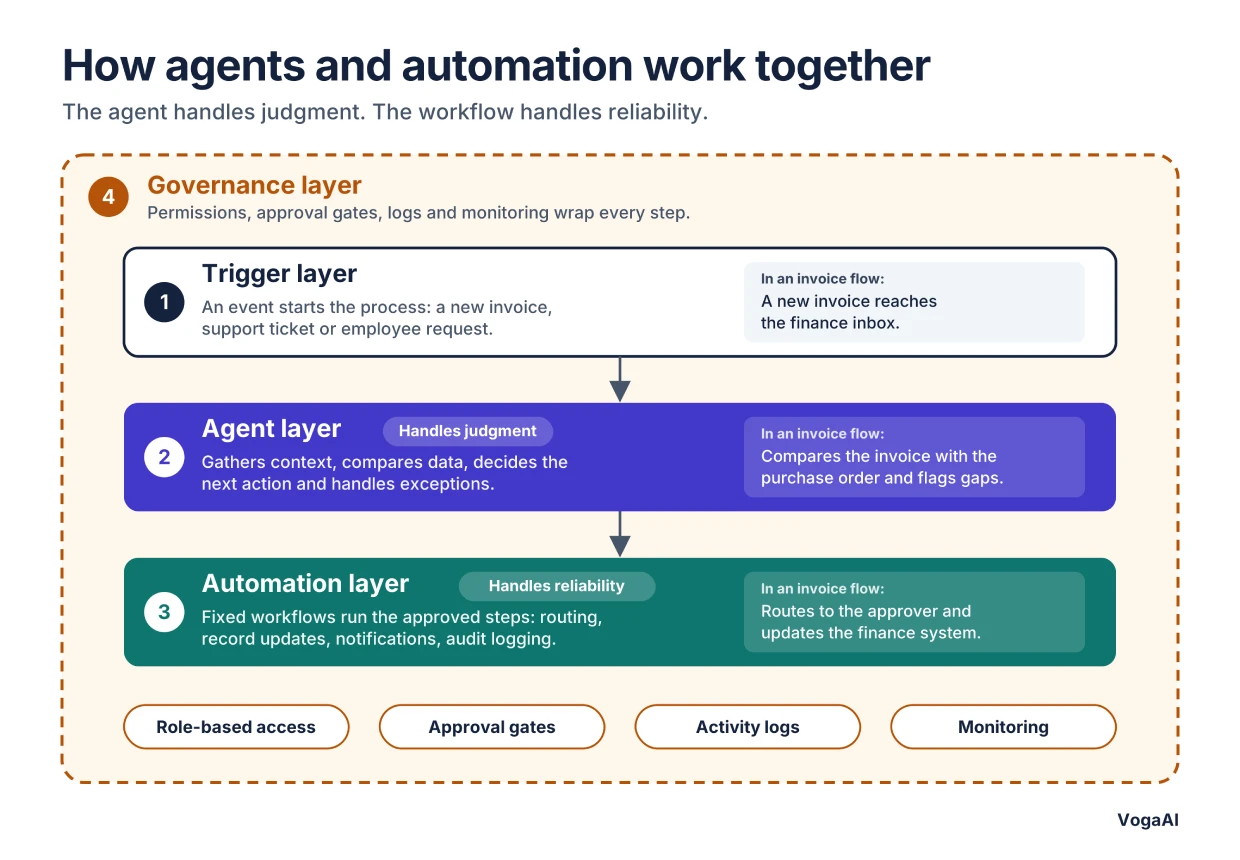
A common production pattern has four layers:
Trigger layer: An event starts the process, such as a new invoice, support ticket, or employee request.
Agent layer: The agent gathers context from connected systems, compares the data, decides the next action, and handles exceptions.
Automation layer: Fixed workflows carry out the approved steps, including routing, record updates, notifications, and audit logging.
Governance layer: Permissions, approval gates, activity logs, and monitoring wrap the whole process.
The agent handles judgment, and the workflow handles reliability. This keeps the flexible part contained and the routine part predictable.
For example, consider an invoice approval operation:
Trigger: A new invoice arrives in the finance inbox.
Agent: The agent reads the invoice, retrieves the matching purchase order, and compares the details. It identifies discrepancies, such as a price difference or a missing line item, and decides whether the invoice can proceed, needs more information, or must go to a person.
Automation: Once the agent’s decision is made, a fixed workflow routes the invoice to the right approver, collects the approval, updates the financial system, and notifies the relevant team.
Governance: Throughout, the agent works only within its assigned permissions. Payments above a set threshold require human sign-off, and every decision is logged for audit.
Invoices that match their purchase orders move through quickly, and the agent’s effort goes to the exceptions that would otherwise need manual investigation.
Using both allows businesses to make intelligent decisions while keeping routine tasks organized and consistent.
Business Use Cases for AI Agents
AI agents are useful when business tasks require more than interpreting information or performing a predefined action. They can manage operations that involve multiple decisions, connected applications, and changing execution requirements.
Here are some practical applications across different business functions.
1. Customer Support and Service Management
AI agents can manage customer issues that require information gathering, investigation, and multiple actions across business systems.
For example, when a customer reports a billing issue, an agent can:
📍Retrieve the customer's account and transaction details.
📍Review the billing history to understand the issue.
📍Compare the available information with the customer's complaint.
📍Determine whether a correction or additional investigation is required.
📍Initiate an authorized action or escalate the case to a support specialist.
📍Verify the outcome and update the customer support record.
This approach is useful for customer requests that require investigation rather than a simple predefined response.
2. Sales and Lead Management
AI agents can support sales teams by gathering information about potential customers and coordinating activities across sales applications.
For example, an agent can:
📍Retrieve lead information from the CRM system.
📍Research relevant company details using approved data sources.
📍Evaluate the lead against defined qualification criteria.
📍Identify missing information and determine what needs to be collected.
📍Prepare relevant follow-up communication.
📍Update the CRM record and notify the assigned sales representative.
The agent can adjust its actions based on the information available for each lead instead of applying the same sequence of actions to every prospect.
3. IT Operations and Technical Support
AI agents can assist IT teams with technical incidents that require investigation across different systems.
For example, when an application becomes unavailable, an agent can:
📍Analyze the incident description and identify the affected service.
📍Retrieve relevant system logs and monitoring information.
📍Check known issues and available troubleshooting documentation.
📍Evaluate possible causes based on the collected information.
📍Recommend or execute authorized corrective actions.
📍Verify whether the service has recovered.
📍Escalate unresolved incidents to the appropriate technical team.
This can reduce the time spent gathering information and coordinating initial troubleshooting activities.
4. Human Resource Operations
AI agents can coordinate employee-related requests that involve multiple internal systems and approval requirements.
For example, when an employee requests access to a business resource, an agent can:
📍Understand the requested access and its purpose.
📍Retrieve the employee's role and relevant organizational information.
📍Check the applicable access policies.
📍Determine which approval is required.
📍Initiate the approval request through the appropriate system.
📍Track the approval status and notify the relevant employee.
Sensitive access decisions and permissions should remain subject to the organization's security policies and approval controls.
5. Procurement and Vendor Management
AI agents can assist procurement teams with supplier-related activities that involve multiple information sources and decision points.
For example, an agent can:
📍Retrieve supplier records and purchasing requirements.
📍Gather relevant vendor information from approved sources.
📍Compare supplier details against defined business criteria.
📍Identify missing information or potential discrepancies.
📍Prepare a supplier recommendation for procurement review.
📍Initiate authorized follow-up activities and track responses.
Final supplier selection and high-value purchasing decisions can remain subject to human approval.
These use cases demonstrate how AI agents can coordinate multi-step operations and determine actions based on changing information. Their actual capabilities depend on the quality of connected data, available tools, assigned permissions, and the level of autonomy permitted by the business.
When Should Businesses Choose AI Agents Over AI Automation?
Businesses should choose an approach based on the complexity of the task, the decisions involved, and the flexibility required during execution.
Rule-based and AI automation work well for predictable processes that follow defined steps. AI agents are more suitable for tasks that require contextual understanding, multiple actions, and the ability to adapt based on changing situations.
Choose AI Automation When:
AI automation is suitable for processes that follow a consistent sequence of steps but receive inputs that need AI to interpret, such as messages, emails, or documents.
Consider it when:
- The steps can be defined in advance.
- Inputs are unstructured, such as emails or documents, but the expected outcomes are predictable.
- AI is needed to read, classify, summarize, or draft, not to decide the whole path.
- The same process repeats frequently.
- Once AI has interpreted the input, the next steps follow clear rules.
Example: Classifying incoming support tickets by topic and priority, routing each to the right team, and drafting a suggested reply.
The workflow controls the sequence, and AI handles the interpretation. Because the steps are known, AI automation is sufficient. If a task needs no interpretation at all, such as sending a payment confirmation email when a status changes, plain rule-based automation is enough.
Choose AI Agents When:
AI agents are more suitable when a task requires contextual decision-making and multiple actions that may change depending on the situation.
Consider them when:
- The desired outcome is clear, but the exact steps may vary.
- The task involves information from multiple applications.
- Decisions depend on the current situation and previous results.
- The system needs to determine what action should happen next.
- Multiple steps must be coordinated to complete an objective.
- The process benefits from evaluating outcomes and adapting subsequent actions.
- The agent can operate safely within defined permissions and escalation rules.
Example: Managing a new employee's onboarding by reviewing their role, identifying the required software and system access, submitting access requests, scheduling relevant training, and checking whether all onboarding tasks are completed.
The agent determines which actions are necessary based on the information it gathers and the results of each step.
AI Agents vs AI Automation: Which Should You Choose?
| Business Requirement | Suitable Approach |
| Repeating tasks with fixed instructions | Rule-based automation or AI Automation |
| Processing structured data based on predefined rules | Rule-based automation |
| Executing predictable, step-by-step workflows | Rule-based automation or AI Automation |
| Handling tasks that require contextual understanding | AI Agents |
| Coordinating actions across multiple applications | AI Agents |
| Adapting actions based on previous results | AI Agents |
| Managing complex tasks with changing execution steps | AI Agents |
How to Decide: A Simple Decision Framework
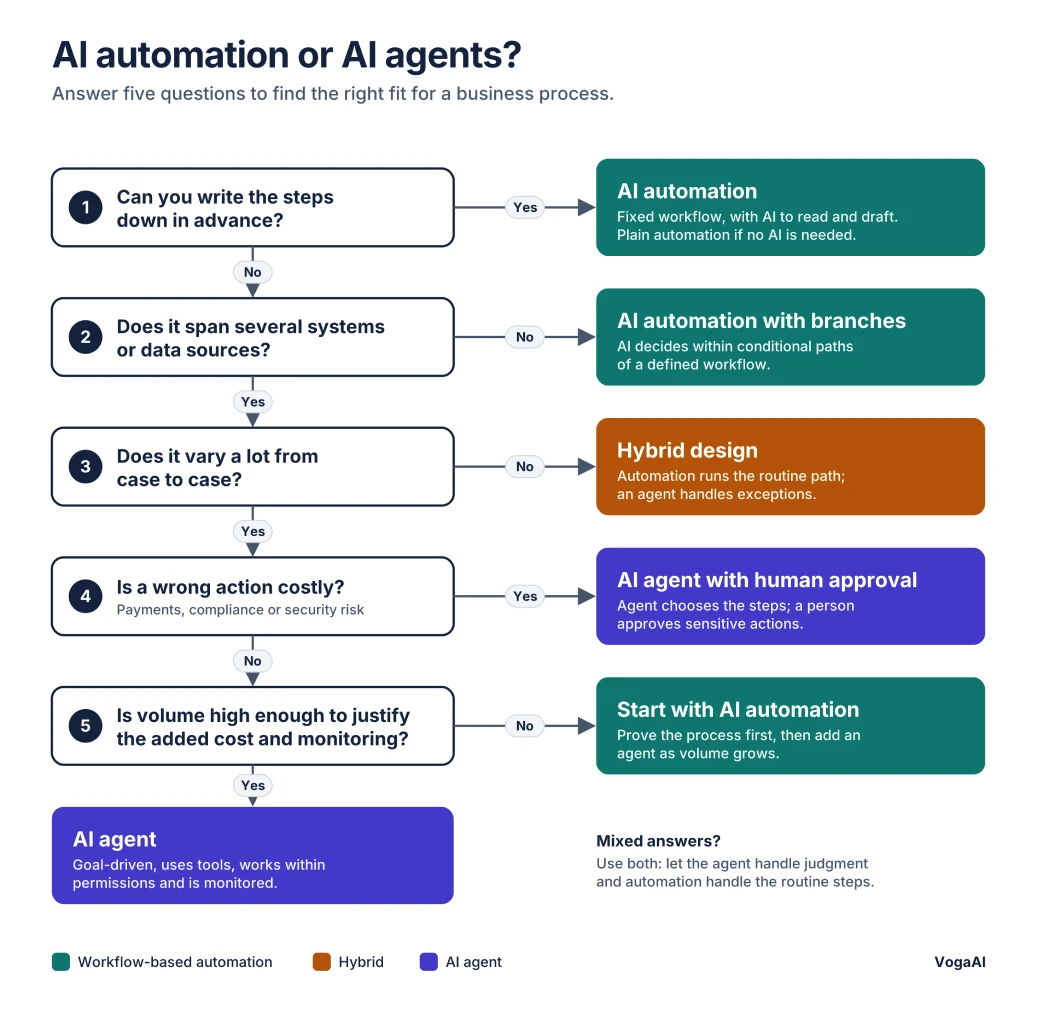
Consider the following five questions when analyzing the process you want to improve:
- Can you determine the steps in advance? If yes, use workflow-based AI automation. If the steps depend on what you discover along the way, consider an agent.
- Does the process involve more than two or three different systems? The more systems and data sources, the more an agent can help.
- How much variation is there between process executions? Low variation favors automation. High variation favors agents.
- What’s the risk of a wrong action? If a mistake means a payment error, a compliance issue, or a security risk, keep a human approval step or use fixed workflows.
- Is volume high enough to justify the added cost and monitoring? Agents usually cost more per task than fixed workflows, so use them where flexibility pays for itself. If volume is low, start with AI automation and add an agent later.
Reading your answers:
- Mostly "steps known, low variation, high risk" leads to AI automation or rule-based automation.
- Mostly "steps vary, many systems, moderate risk" leads to AI agents with human approval for sensitive actions.
- A mix leads to a hybrid design.
Popular Tools and Frameworks for AI Automation and AI Agents
The right tool depends on whether you need workflows, agents, or both. Most teams combine more than one category rather than choosing a single platform.
| Category | Examples | Best Suited For |
| Workflow automation | Zapier, Make, n8n, Microsoft Power Automate | Rule-based flows with AI steps for reading, classifying, and drafting |
| RPA | UiPath, Automation Anywhere, Blue Prism | Stable, high-volume desktop and web tasks with structured inputs |
| Agent frameworks | LangChain and LangGraph, CrewAI, Microsoft Agent Framework | Custom agents and multi-agent systems that plan, use tools, and adapt |
| Model-provider tooling | Agent SDKs and tool-use APIs from major AI model providers | Building agents directly on a model API with full control |
How to Implement AI Agents in Business Operations
Implementing AI agents requires more than selecting an AI model and connecting it to business applications. Businesses need to define the agent's objectives, determine how it should use available context, establish its permissions, and evaluate how effectively it completes assigned tasks.
The following steps provide a practical implementation approach.
1. Define the Business Objective
Start by identifying a business task that requires contextual understanding, multi-step execution, or decisions across connected systems.
Establish:
✔ The business problem the agent should address.
✔ The expected outcome of the task.
✔ The information required to achieve that outcome.
✔ The decisions the agent needs to make.
✔ The conditions that require human intervention.
Choose a focused use case rather than attempting to introduce an agent across an entire department immediately.
2. Establish the Agent's Responsibilities and Boundaries
Clearly define what the agent is authorized to do and which decisions require approval.
Specify:
✔ The tasks it can perform independently.
✔ The decisions it can make within its assigned role.
✔ The applications and data it can access.
✔ The actions that require human approval.
✔ The conditions that should trigger escalation.
✔ The operations it must not perform.
These boundaries help ensure that the agent operates within the organization's policies and security requirements.
3. Select the AI Models and Agent Architecture
Choose the technology based on the complexity of the task and the capabilities required.
The implementation may include:
✔ Large Language Models (LLMs): Interpret instructions, understand natural language, and support reasoning and action selection.
✔ Agent orchestration frameworks: Coordinate the agent's reasoning, tool calls, and execution flow.
✔ Retrieval-Augmented Generation (RAG): Retrieve relevant information from business knowledge sources to support context-based responses and decisions.
✔ APIs and integrations: Connect the agent with CRM, ERP, support platforms, databases, and other business applications.
✔ Memory and state management: Maintain relevant task context and track progress across multiple interactions or execution steps.
Not every AI agent requires all these components. The architecture should match the business objective, complexity, and operational requirements.
4. Connect Business Systems and Tools
AI agents need access to the information and tools required to complete their assigned tasks.
Integrate the necessary systems through APIs or approved connectors. Configure authentication, access permissions, and data exchange rules to ensure the agent interacts only with authorized resources.
Also establish how the agent should handle unavailable data, failed API requests, and unexpected system responses.
Test each integration independently before allowing the agent to execute complete business operations.
5. Establish Security and Human Oversight
AI agents may access sensitive business information or perform actions that affect operational systems. Security and control mechanisms must therefore be part of the implementation.
Consider:
✔ Role-based access controls.
✔ Data privacy and protection policies.
✔ Input validation and protection against prompt injection.
✔ Approval requirements for sensitive actions.
✔ Activity logs and execution records.
✔ Escalation procedures for uncertain or high-risk situations.
✔ Restrictions on the tools and operations available to the agent.
The level of autonomy should depend on the risk associated with each action. For example, retrieving account information may be permitted independently, while approving payments or modifying sensitive records may require human authorization.
6. Test, Deploy, and Monitor Agent Performance
Before production deployment, test the agent using realistic business scenarios, including incomplete information, unexpected inputs, unavailable tools, and failed operations.
Monitor performance using relevant measures such as:
✔ Task completion rate: How often the agent achieves its assigned objective.
✔ Decision accuracy: Whether its selected actions are appropriate for the available information.
✔ Execution time: How long it takes to complete a task.
✔ Tool interaction success: Whether connected applications and APIs respond as expected.
✔ Human escalation frequency: How often the agent requires intervention.
✔ Operational errors: How frequently it performs incorrect or incomplete actions.
✔ Cost per completed task: The resources required to complete an operation.
Use these results to identify limitations, improve instructions, refine integrations, and adjust the agent's permissions.
Continuous monitoring is important because business requirements, connected systems, and operating conditions can change over time.
Conclusion
Choosing between AI agents and AI automation depends on the business problem you want to solve. Understanding AI agents vs AI automation helps businesses invest in the right technology, whether the goal is to streamline existing workflows, reduce manual effort, improve operational efficiency, or manage complex tasks that require adaptive decision-making.
Connect with VogaAI, an Artificial intelligence development company, for intelligent AI solutions that improve business process productivity, whether you want to build AI agents or automate business workflows.
FAQs
1. What Is the Difference Between AI Agents and AI Automation?
AI automation: Uses artificial intelligence to interpret information and perform tasks within an established workflow.
AI agents: Use goal-oriented reasoning to determine the next steps required to achieve a defined objective.
The main distinction lies in how each technology handles decision-making and task execution.
2. Are AI Agents Better Than AI Automation?
Neither is universally better because each serves different business needs. AI automation is effective for improving existing processes, while AI agents are useful for handling tasks that require flexible decisions and coordination across multiple systems.
3. Can AI Agents and AI Automation Work Together?
Yes. AI agents can analyze situations and decide which actions are needed, while AI automation can execute routine tasks such as updating records, sending notifications, and processing requests. Using both can create more efficient business operations.
4. When Should Businesses Use AI Agents Instead of AI Automation?
Businesses should consider AI agents when tasks involve changing conditions, multiple information sources, or decisions that cannot be covered by simple predefined rules. AI automation is generally more suitable for repetitive activities with predictable outcomes.
5. Can AI Agents Operate Without Human Intervention?
Yes, AI agents can perform certain tasks independently when provided with the necessary tools, access, and permissions. However, sensitive decisions and high-impact operations should include human review and approval to maintain control and accountability.
6. How Much Does It Cost to Implement AI Agents in a Business?
The cost depends on the agent’s complexity, the number of integrations, the AI models used, and security requirements. A simple single-task agent typically costs around $10,000 to $30,000, a mid-complexity agent connected to several business systems around $30,000 to $100,000, and an enterprise multi-agent solution $150,000 or more. Ongoing costs for model usage, hosting, and maintenance are extra. For an accurate estimate, contact VogaAI.
7. What is the Difference Between Agentic AI and AI Agents?
An AI agent is a specific system that pursues a goal using tools. Agentic AI is the broader approach of building systems that plan, act, evaluate, and adapt, and it may involve one or several agents.
8. Are AI Agents Replacing RPA?
Not entirely. RPA remains efficient for stable, structured, high-volume tasks. Agents are better for tasks with unstructured inputs or changing conditions, and many businesses use both.
9. What Is the Difference Between an AI Agent and a Chatbot?
A chatbot mainly answers questions. An AI agent can also take actions across business systems, check the results, and decide what to do next.
10. What Are the Risks of Using AI Agents?
The main risks are incorrect actions from hallucinated information, unpredictable behavior, higher cost per task, security issues such as prompt injection, and unclear accountability. Permissions, approval gates, monitoring, and testing reduce them.
11. Which Is Cheaper, AI Automation or AI Agents?
AI automation is usually cheaper to build and run for well-defined processes. Agents cost more because of added reasoning, testing, and monitoring, but can pay off on complex, variable tasks.